Your source for free career building tools and freeware
Resume Printing Tips
Resume printing tips are simple instructions showing how to properly print your resume with no header or footer. Also, with the proper one-inch margins among various browsers. How to print a resume.
You can print your resume using Chrome, Firefox, Edge, Internet Explorer, and Opera. This guide mainly describes the Windows operating system, but there is no reason you can't use it with Mac or Linux.
Although for Mac or Linux you may have to use these instructions as a guide and adapt them to your own system and browser. The simple instructions, complete with pictures, show you how to set up the page for proper printing for optimal results.
For Chrome Users
- Click the Hamburger at the top, right corner.
- Click Print then, More Settings.
- Set Margins to one inch, clear Headers and Footers option.
For Edge or Internet Explorer Users
- In Edge or Internet Explorer go to File or the Gear, then Page Setup, find the section labeled Headers and Footers.
- So you can return it to its original state copy down on a piece of paper the characters listed under the Header and Footer fields.
Then, delete all of the characters in the Header and Footer fields. See the first image as an example of what you may find entered there.
- Next you want to set the margins to one inch so that the whole page can be printed from top to bottom and from the left edge to the right edge.
That should do it, see the second image as an example of how it should look when you are finished. If you don't set the margins to one inch and you try
to print the page, you will end up with improperly sized margins.
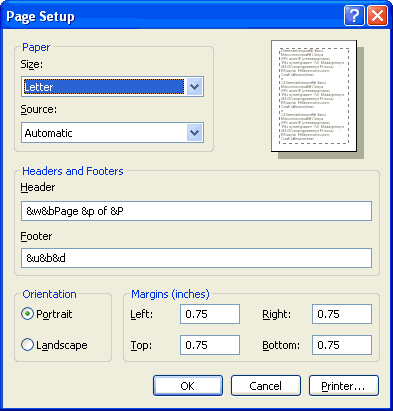
An example of what you may find in your page setup properties tab.
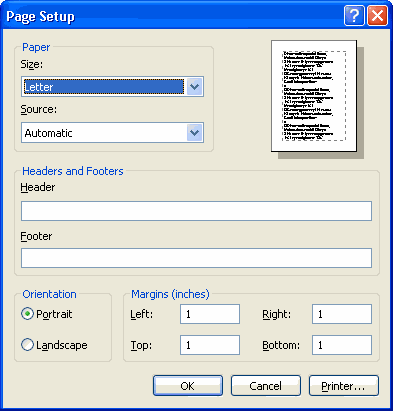
How it should look when you are finished.
For Firefox Users
- In Firefox go to File, then Page Setup, click the Headers and Footers tab.
- To return it to its original state copy down on a piece of paper the original settings listed in the Margins and Header and Footer fields.
Then, set all the drop down boxes to --blank-- in the Header and Footer fields. See the first image as an example of what you may find entered there.
- Next you want to set the margins to one inch so that the whole page can be printed from top to bottom and from the left edge to the right edge.
That should do it, see the second image as an example of how it should look when you are finished. If you don't set the margins to one inch and you try
to print the page you will end up with improperly sized margins.
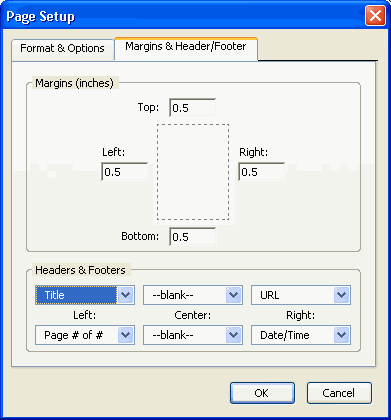
An example of what you may find in your page setup properties tab.
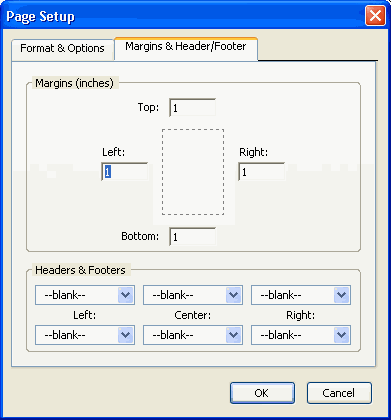
How it should look when you are finished.
For Opera Users
- In Opera go to File, then Print Options, clear the Print Headers and Footers box.
- Set the drop down box Scale Print to 100%.
- Next you want to set the margins to one inch so that the whole page can be printed from top to bottom and from the left edge to the right edge.
That should do it, you are finished. If you don't set the margins to one inch and you try to print the page you will end up with improperly sized margins.